
Tokenisation and stopwords
Last updated on 2026-08-18 | Edit this page
Overview
Questions
- How is text prepared for analysis?
Objectives
- Ability to tokenise a text
- Ability to remove stopwords from text
Tokenisation
Since we are working with text mining, we focus on the
text coloumn. We do this because the coloumn contains the
text from the articles in question.
To tokenise a column, we use the functions
unnest_tokens() from the tidytext-package. The
function gets two arguments. The first one is word. This
defines that the text should be split up by words. The second argument,
text, defines the column that we want to tokenise.
R
articles_tidy <- articles |>
  unnest_tokens(word, text)
articles_tidy
OUTPUT
# A tibble: 2,405,300 × 7
      id date    section region author                          wordcount word
   <dbl> <chr>   <chr>   <chr>  <chr>                               <dbl> <chr>
 1     1 2026-05 News    UK     Jessica Murray and Robert Booth      1328 brita…
 2     1 2026-05 News    UK     Jessica Murray and Robert Booth      1328 biome…
 3     1 2026-05 News    UK     Jessica Murray and Robert Booth      1328 watch…
 4     1 2026-05 News    UK     Jessica Murray and Robert Booth      1328 have
 5     1 2026-05 News    UK     Jessica Murray and Robert Booth      1328 warned
 6     1 2026-05 News    UK     Jessica Murray and Robert Booth      1328 that
 7     1 2026-05 News    UK     Jessica Murray and Robert Booth      1328 natio…
 8     1 2026-05 News    UK     Jessica Murray and Robert Booth      1328 overs…
 9     1 2026-05 News    UK     Jessica Murray and Robert Booth      1328 of
10     1 2026-05 News    UK     Jessica Murray and Robert Booth      1328 ai
# ℹ 2,405,290 more rowsTokenisation
The result of the tokenisation is 2,405,300 rows. The reason is that
the text-column has been replaced by a new column named
word. This column contains all words found in all of the
articles. The information from the remaining columns is kept. This makes
is possible to determine which article each word belongs to. The reason
the data set contains so many more rows is that each word is on a row of
its own.
Stopwords
The next step is to remove stopwords. We have chosen to use the
stopword list from the package tidytext. The list contains
1,149 words that are considered stopwords. Other lists are available,
and they differ in terms of how many words they contain.
R
data(stop_words)
stop_words
OUTPUT
# A tibble: 1,149 × 2
   word        lexicon
   <chr>       <chr>
 1 a           SMART
 2 a's         SMART
 3 able        SMART
 4 about       SMART
 5 above       SMART
 6 according   SMART
 7 accordingly SMART
 8 across      SMART
 9 actually    SMART
10 after       SMART
# ℹ 1,139 more rowsAdding and removing stopwords
You may find yourself in need of either adding or removing words from the stopwords list.
Here is how you add and remove stopwords to a predefined list.
First, create a tibble with the word you wish to add to the stopwords list
R
new_stop_words <- tibble(
  word = c("cat", "dog"),
  lexicon = "my_stopwords"
)
Then make a new stopwords tibble based on the original one, but with the new words added.
R
updated_stop_words <- stop_words |>
  bind_rows(new_stop_words)
Run the following code to see that the added lexicon
my_stopwords contains two words.
R
updated_stop_words |>
  count(lexicon)
OUTPUT
# A tibble: 4 × 2
  lexicon          n
  <chr>        <int>
1 SMART          571
2 my_stopwords     2
3 onix           404
4 snowball 174First, create a vector with the word(s) you wish to remove from the stopwords list.
R
words_to_remove <- c("cat", "dog")
Then remove the rows containing the unwanted words.
R
updated_stop_words <- stop_words |>
  filter(!word %in% words_to_remove)
Run the following code to see that the added lexicon
my_stopwords nolonger exists.
R
updated_stop_words |>
  count(lexicon)
OUTPUT
# A tibble: 3 × 2
  lexicon      n
  <chr>    <int>
1 SMART      571
2 onix       404
3 snowball   174
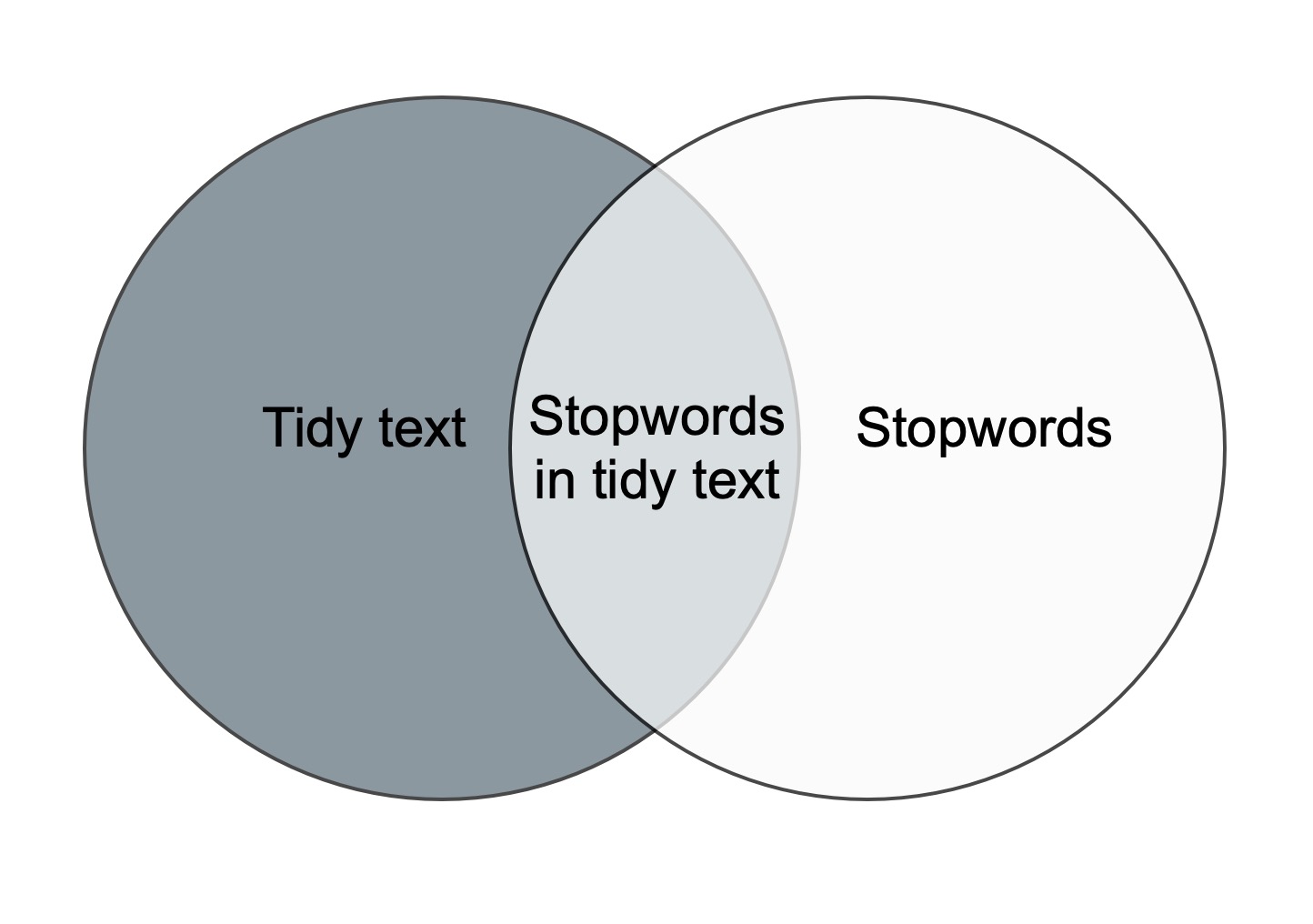
In order to remove stopwords from articles_tidy, we have
to use the anti_join-function.
R
articles_anti_join <- articles_tidy |>
  anti_join(stop_words, by = "word")
articles_anti_join
OUTPUT
# A tibble: 1,118,028 × 7
      id date    section region author                          wordcount word
   <dbl> <chr>   <chr>   <chr>  <chr>                               <dbl> <chr>
 1     1 2026-05 News    UK     Jessica Murray and Robert Booth      1328 brita…
 2     1 2026-05 News    UK     Jessica Murray and Robert Booth      1328 biome…
 3     1 2026-05 News    UK     Jessica Murray and Robert Booth      1328 watch…
 4     1 2026-05 News    UK     Jessica Murray and Robert Booth      1328 warned
 5     1 2026-05 News    UK     Jessica Murray and Robert Booth      1328 natio…
 6     1 2026-05 News    UK     Jessica Murray and Robert Booth      1328 overs…
 7     1 2026-05 News    UK     Jessica Murray and Robert Booth      1328 ai
 8     1 2026-05 News    UK     Jessica Murray and Robert Booth      1328 power…
 9     1 2026-05 News    UK     Jessica Murray and Robert Booth      1328 scann…
10     1 2026-05 News    UK     Jessica Murray and Robert Booth      1328 catch
# ℹ 1,118,018 more rows
The anti_join-function removes the stopwords from the
orginal dataset. This is illustrated in the figure below. The only part
left after anti-joining is the dark grey area to the left.
These words are saved as the object
articles_anti_join.
- Know how to prepare text for analysis