
Using POST
Last updated on 2026-10-20 | Edit this page
Estimated time: 45 minutes
Overview
Questions
- How do I get data from an API using the POST method?
Objectives
- Connect to Statistics Denmark, and extract data
- Create a list of lists to control the variables to be extracted
Please note: These pages are autogenerated. Some of the API-calls may fail during that process. We are figuring out what to do about it, but please excuse us for any red errors on the pages for the time being.
Getting data from Statistics Denmark
The API from statistics Denmark can accept GET requests. But they recommend using POST instead. That allows us to do more advanced searches for data easier.
We are going to write a POST-request (with a little help from R), to retrieve data from Statistics Denmark.
But before we can do that, we need to know how the Statistics Denmark API expects to receive data.
Hopefully we can get that by reading the documentation, that can be found here.
But that is rather confusing.
The main points:
First: Statistics Denmark provides four “functions”, or endpoints. This is equivalent to the URL we requested data from using the GET method.
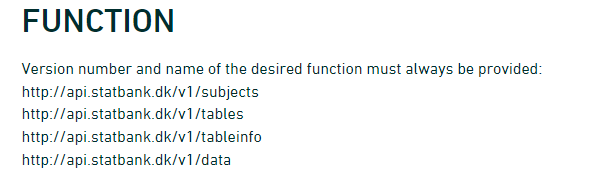
- The first is the “web”-site we have to send requests to if we want information on the subjects in Statistics Denmark.
- In the second we get information about which tables are available for a given subject.
- The third will provide metadata on a table.
- When we finally need the data, we will visit the last endpoint.
Secondly: We need to provide a body containing search parameters in a format like this:
R
{
   "table": "folk1c"
}
Let us look at how to do this, by sending a request to
subjects.
The endpoint was
R
endpoint <- "http://api.statbank.dk/v1/subjects"
We will now need to construct a named list for the content of the body that we send along with our request.
This is a new datastructure that we have not encountered before.
Vectors are annoying because they can only contain one datatype. And dataframes must be rectangular.
A list allows us to store basically anything. The reason that we do not use them for everything is that they are a bit more difficult to work with.
R
our_body <- list(lang = "en", recursive = FALSE,
                  includeTables = FALSE, subjects = NULL)
This list contains four elements, with names. - The first,
lang, contains a character vector (length 1), containing
“en”, the language that we want Statistics Denmark to use when returning
data. - recursive and includeTables are
logical values, both false. - subjects is a special value,
NULL. This is not a missing value, there simply isn’t anything there.
But this nothing does have a name.
lists
Lists are subset in a special way. If we want the first element in
our_body, we can use the usual bracket notation:
R
our_body[1]
OUTPUT
$lang
[1] "en"
If we want the actual value of element 1, we use a double bracket notation:
R
our_body[[1]]
OUTPUT
[1] "en"Now we have the two things we need, an endpoint to send a request, and a body containing what we want returned.
Let us try it:
R
result <- httr::POST(endpoint, body=our_body, encode = "json")
We specify that the request should be encoded as “json”.
Let us look at the result:
R
result
OUTPUT
Response [https://api.statbank.dk/v1/subjects]
  Date: 2026-10-20 03:34
  Status: 200
  Content-Type: text/json; charset=utf-8
  Size: 903 B
Both informative. And utterly useless. The informative information is that our request succeeded (cave - it might not succeed on this webpage). We can see that in the status. 200 is an internet code for success.
Let us get the content of the result, which is what we actually want:
R
result |>
  content()
OUTPUT
[1] "[{\"id\":\"1\",\"description\":\"People\",\"active\":true,\"hasSubjects\":true,\"subjects\":[]},{\"id\":\"2\",\"description\":\"Labour and income\",\"active\":true,\"hasSubjects\":true,\"subjects\":[]},{\"id\":\"3\",\"description\":\"Economy\",\"active\":true,\"hasSubjects\":true,\"subjects\":[]},{\"id\":\"4\",\"description\":\"Social conditions\",\"active\":true,\"hasSubjects\":true,\"subjects\":[]},{\"id\":\"5\",\"description\":\"Education and research\",\"active\":true,\"hasSubjects\":true,\"subjects\":[]},{\"id\":\"6\",\"description\":\"Business\",\"active\":true,\"hasSubjects\":true,\"subjects\":[]},{\"id\":\"7\",\"description\":\"Transport\",\"active\":true,\"hasSubjects\":true,\"subjects\":[]},{\"id\":\"8\",\"description\":\"Culture and leisure\",\"active\":true,\"hasSubjects\":true,\"subjects\":[]},{\"id\":\"9\",\"description\":\"Environment and energy\",\"active\":true,\"hasSubjects\":true,\"subjects\":[]},{\"id\":\"19\",\"description\":\"About Statistics Denmark\",\"active\":true,\"hasSubjects\":true,\"subjects\":[]}]"More informative, but not really easy to read.
The library jsonlite has a function that converts this
to something readable:
R
result |>
  content() |>
  fromJSON()
OUTPUT
   id              description active hasSubjects subjects
1   1                   People   TRUE        TRUE     NULL
2   2        Labour and income   TRUE        TRUE     NULL
3   3                  Economy   TRUE        TRUE     NULL
4   4        Social conditions   TRUE        TRUE     NULL
5   5   Education and research   TRUE        TRUE     NULL
6   6                 Business   TRUE        TRUE     NULL
7   7                Transport   TRUE        TRUE     NULL
8   8      Culture and leisure   TRUE        TRUE     NULL
9   9   Environment and energy   TRUE        TRUE     NULL
10 19 About Statistics Denmark   TRUE        TRUE     NULL
A nice dataframe with the ten major subjects in the databases of Statistics Denmark.
Subject 1 contains information about populations and elections.
There are sub-subjects under that. We can see that in the column
hasSubjects
We now modify our body that we send with the request, to return information about the first subject.
We need to make sure that the number of the subject, 1
is intepreted as it is. This is a little bit of mysterious handwaving -
we simply put the 1 inside the function I() and stuff
works.
R
our_body <- list(lang = "en", recursive = F,
                  includeTables = F, subjects = I(1))
I()
I() isolates - or insulates - the contents of
I() from the gaze of R’s parsing code. Basically it
prevents R from doing stuff to the content that we dont want it to. In
this specific case, the POST() function would convert the
vector 1, with length 1, to a scalar, the more basic data type in R,
that hold only one, single, atomic value at a time.
Note that it is important that we tell the POST()
function that the body is the body:
R
data <- POST(endpoint, body=our_body, encode = "json") |>
  content() |>
  fromJSON()

data
OUTPUT
  id description active hasSubjects
1  1      People   TRUE        TRUE
                                                                                                                                                                                                                                                   subjects
1 3401, 3407, 3410, 3415, 3412, 3411, 3428, 3409, Population, Households and family matters , Migration, Housing, Health, Democracy, National church, Names, TRUE, TRUE, TRUE, TRUE, TRUE, TRUE, TRUE, TRUE, TRUE, TRUE, TRUE, TRUE, TRUE, TRUE, TRUE, TRUE
Not that easy to see in this format, but the data frame contains a
data frame. That is, in the column subjects the content is
a data frame.
We pick that out using the $-notation:
R
data$subjects
OUTPUT
[[1]]
    id                    description active hasSubjects subjects
1 3401                     Population   TRUE        TRUE     NULL
2 3407 Households and family matters    TRUE        TRUE     NULL
3 3410                      Migration   TRUE        TRUE     NULL
4 3415                        Housing   TRUE        TRUE     NULL
5 3412                         Health   TRUE        TRUE     NULL
6 3411                      Democracy   TRUE        TRUE     NULL
7 3428                National church   TRUE        TRUE     NULL
8 3409                          Names   TRUE        TRUE     NULL
These are the sub-subjects of subject 1.
Let us look closer at 3401, Population.
Again, we modify the call we send to the endpoint:
R
our_body <- list(lang = "en", recursive = F,
                  includeTables = F, subjects = I(3401))
R
data <- POST(endpoint, body=our_body, encode = "json") |>
  content() |>
  fromJSON()

data
OUTPUT
    id description active hasSubjects
1 3401  Population   TRUE        TRUE
                                                                                                                                                                                                                                                                                              subjects
1 20021, 20024, 20022, 20019, 20017, 20018, 20014, 20015, Population figures, Immigrants and their descendants, Population projections, Adoptions, Births, Fertility, Deaths, Life expectancy, TRUE, TRUE, TRUE, FALSE, TRUE, TRUE, TRUE, TRUE, FALSE, FALSE, FALSE, FALSE, FALSE, FALSE, FALSE, FALSE
We delve deeper into it:
R
data$subjects
OUTPUT
[[1]]
     id                      description active hasSubjects subjects
1 20021               Population figures   TRUE       FALSE     NULL
2 20024 Immigrants and their descendants   TRUE       FALSE     NULL
3 20022           Population projections   TRUE       FALSE     NULL
4 20019                        Adoptions  FALSE       FALSE     NULL
5 20017                           Births   TRUE       FALSE     NULL
6 20018                        Fertility   TRUE       FALSE     NULL
7 20014                           Deaths   TRUE       FALSE     NULL
8 20015                  Life expectancy   TRUE       FALSE     NULL
And now we are at the bottom. 20021 Population figures does not have any sub-sub-subjects.
Next, let us take a look at the tables contained under subject 20021.
We need the next endpoint, which provides information about tables under a subject:
R
endpoint <- "http://api.statbank.dk/v1/tables"
R
our_body <- list(lang = "en", subjects = I(20021))
data <- POST(endpoint, body=our_body, encode = "json") |>
  content() |>
  fromJSON()
data |> head()
OUTPUT
       id                                       text   unit             updated
1  FOLK1A Population at the first day of the quarter Number 2026-08-10T08:00:00
2 FOLK1AM   Population at the first day of the month Number 2026-10-09T08:00:00
3 BEFOLK3                      Population 1. January Number 2026-07-01T08:00:00
4 BEFOLK1                      Population 1. January Number 2026-02-12T08:00:00
5 BEFOLK2                      Population 1. January Number 2026-02-12T08:00:00
6   FOLK3                      Population 1. January Number 2026-02-12T08:00:00
  firstPeriod latestPeriod active
1      2008Q1       2026Q3   TRUE
2     2021M10      2026M09   TRUE
3        2008         2026   TRUE
4        1971         2026   TRUE
5        1901         2026   TRUE
6        2008         2026   TRUE
                                       variables
1         region, sex, age, marital status, time
2                         region, sex, age, time
3                         region, sex, age, time
4                 sex, age, marital status, time
5                                 sex, age, time
6 day of birth, birth month, year of birth, time
There are 21 tables under this subject. Let us see what information we can get about table “FOLK1A”:
We now need the third endpoint:
R
endpoint <- "http://api.statbank.dk/v1/tableinfo"
R
our_body <- list(lang = "en", table = "FOLK1A")
data <- POST(endpoint, body=our_body, encode = "json") |>
  content() |>
  fromJSON()
data
OUTPUT
$id
[1] "FOLK1A"
$text
[1] "Population at the first day of the quarter"
$description
[1] "Population at the first day of the quarter by region, sex, age, marital status and time"
$unit
[1] "Number"
$suppressedDataValue
[1] "0"
$updated
[1] "2026-08-10T08:00:00"
$active
[1] TRUE
$contacts
name phone mail
1 Dorthe Larsen +4523498326 dla@dst.dk
$documentation
$documentation$id
[1] "4a12721d-a8b0-4bde-82d7-1d1c6f319de3"
$documentation$url
[1] "https://www.dst.dk/documentationofstatistics/4a12721d-a8b0-4bde-82d7-1d1c6f319de3"
$footnote
NULL
$variables
id text elimination time map
1 OMRÅDE region TRUE FALSE denmark_municipality_07
2 KØN sex TRUE FALSE <NA>
3 ALDER age TRUE FALSE <NA>
4 CIVILSTAND marital status TRUE FALSE <NA>
5 Tid time FALSE TRUE <NA>
values
1 000, 084, 101, 147, 155, 185, 165, 151, 153, 157, 159, 161, 163, 167, 169, 183, 173, 175, 187, 201, 240, 210, 250, 190, 270, 260, 217, 219, 223, 230, 400, 411, 085, 253, 259, 350, 265, 269, 320, 376, 316, 326, 360, 370, 306, 329, 330, 340, 336, 390, 083, 420, 430, 440, 482, 410, 480, 450, 461, 479, 492, 530, 561, 563, 607, 510, 621, 540, 550, 573, 575, 630, 580, 082, 710, 766, 615, 707, 727, 730, 741, 740, 746, 706, 751, 657, 661, 756, 665, 760, 779, 671, 791, 081, 810, 813, 860, 849, 825, 846, 773, 840, 787, 820, 851, All Denmark, Region Hovedstaden, Copenhagen, Frederiksberg, Dragør, Tårnby, Albertslund, Ballerup, Brøndby, Gentofte, Gladsaxe, Glostrup, Herlev, Hvidovre, Høje-Taastrup, Ishøj, Lyngby-Taarbæk, Rødovre, Vallensbæk, Allerød, Egedal, Fredensborg, Frederikssund, Furesø, Gribskov, Halsnæs, Helsingør, Hillerød, Hørsholm, Rudersdal, Bornholm, Christiansø, Region Sjælland, Greve, Køge, Lejre, Roskilde, Solrød, Faxe, Guldborgsund, Holbæk, Kalundborg, Lolland, Næstved, Odsherred, Ringsted, Slagelse, Sorø, Stevns, Vordingborg, Region Syddanmark, Assens, Faaborg-Midtfyn, Kerteminde, Langeland, Middelfart, Nordfyns, Nyborg, Odense, Svendborg, Ærø, Billund, Esbjerg, Fanø, Fredericia, Haderslev, Kolding, Sønderborg, Tønder, Varde, Vejen, Vejle, Aabenraa, Region Midtjylland, Favrskov, Hedensted, Horsens, Norddjurs, Odder, Randers, Samsø, Silkeborg, Skanderborg, Syddjurs, Aarhus, Herning, Holstebro, Ikast-Brande, Lemvig, Ringkøbing-Skjern, Skive, Struer, Viborg, Region Nordjylland, Brønderslev, Frederikshavn, Hjørring, Jammerbugt, Læsø, Mariagerfjord, Morsø, Rebild, Thisted, Vesthimmerlands, Aalborg
2 TOT, 1, 2, Total, Men, Women
3 IALT, 0, 1, 2, 3, 4, 5, 6, 7, 8, 9, 10, 11, 12, 13, 14, 15, 16, 17, 18, 19, 20, 21, 22, 23, 24, 25, 26, 27, 28, 29, 30, 31, 32, 33, 34, 35, 36, 37, 38, 39, 40, 41, 42, 43, 44, 45, 46, 47, 48, 49, 50, 51, 52, 53, 54, 55, 56, 57, 58, 59, 60, 61, 62, 63, 64, 65, 66, 67, 68, 69, 70, 71, 72, 73, 74, 75, 76, 77, 78, 79, 80, 81, 82, 83, 84, 85, 86, 87, 88, 89, 90, 91, 92, 93, 94, 95, 96, 97, 98, 99, 100, 101, 102, 103, 104, 105, 106, 107, 108, 109, 110, 111, 112, 113, 114, 115, 116, 117, 118, 119, 120, 121, 122, 123, 124, 125, Age, total, 0 years, 1 year, 2 years, 3 years, 4 years, 5 years, 6 years, 7 years, 8 years, 9 years, 10 years, 11 years, 12 years, 13 years, 14 years, 15 years, 16 years, 17 years, 18 years, 19 years, 20 years, 21 years, 22 years, 23 years, 24 years, 25 years, 26 years, 27 years, 28 years, 29 years, 30 years, 31 years, 32 years, 33 years, 34 years, 35 years, 36 years, 37 years, 38 years, 39 years, 40 years, 41 years, 42 years, 43 years, 44 years, 45 years, 46 years, 47 years, 48 years, 49 years, 50 years, 51 years, 52 years, 53 years, 54 years, 55 years, 56 years, 57 years, 58 years, 59 years, 60 years, 61 years, 62 years, 63 years, 64 years, 65 years, 66 years, 67 years, 68 years, 69 years, 70 years, 71 years, 72 years, 73 years, 74 years, 75 years, 76 years, 77 years, 78 years, 79 years, 80 years, 81 years, 82 years, 83 years, 84 years, 85 years, 86 years, 87 years, 88 years, 89 years, 90 years, 91 years, 92 years, 93 years, 94 years, 95 years, 96 years, 97 years, 98 years, 99 years, 100 years, 101 years, 102 years, 103 years, 104 years, 105 years, 106 years, 107 years, 108 years, 109 years, 110 years, 111 years, 112 years, 113 years, 114 years, 115 years, 116 years, 117 years, 118 years, 119 years, 120 years, 121 years, 122 years, 123 years, 124 years, 125 years
4 TOT, U, G, E, F, Total, Never married, Married/separated, Widowed, Divorced
5 2008K1, 2008K2, 2008K3, 2008K4, 2009K1, 2009K2, 2009K3, 2009K4, 2010K1, 2010K2, 2010K3, 2010K4, 2011K1, 2011K2, 2011K3, 2011K4, 2012K1, 2012K2, 2012K3, 2012K4, 2013K1, 2013K2, 2013K3, 2013K4, 2014K1, 2014K2, 2014K3, 2014K4, 2015K1, 2015K2, 2015K3, 2015K4, 2016K1, 2016K2, 2016K3, 2016K4, 2017K1, 2017K2, 2017K3, 2017K4, 2018K1, 2018K2, 2018K3, 2018K4, 2019K1, 2019K2, 2019K3, 2019K4, 2020K1, 2020K2, 2020K3, 2020K4, 2021K1, 2021K2, 2021K3, 2021K4, 2022K1, 2022K2, 2022K3, 2022K4, 2023K1, 2023K2, 2023K3, 2023K4, 2024K1, 2024K2, 2024K3, 2024K4, 2025K1, 2025K2, 2025K3, 2025K4, 2026K1, 2026K2, 2026K3, 2008Q1, 2008Q2, 2008Q3, 2008Q4, 2009Q1, 2009Q2, 2009Q3, 2009Q4, 2010Q1, 2010Q2, 2010Q3, 2010Q4, 2011Q1, 2011Q2, 2011Q3, 2011Q4, 2012Q1, 2012Q2, 2012Q3, 2012Q4, 2013Q1, 2013Q2, 2013Q3, 2013Q4, 2014Q1, 2014Q2, 2014Q3, 2014Q4, 2015Q1, 2015Q2, 2015Q3, 2015Q4, 2016Q1, 2016Q2, 2016Q3, 2016Q4, 2017Q1, 2017Q2, 2017Q3, 2017Q4, 2018Q1, 2018Q2, 2018Q3, 2018Q4, 2019Q1, 2019Q2, 2019Q3, 2019Q4, 2020Q1, 2020Q2, 2020Q3, 2020Q4, 2021Q1, 2021Q2, 2021Q3, 2021Q4, 2022Q1, 2022Q2, 2022Q3, 2022Q4, 2023Q1, 2023Q2, 2023Q3, 2023Q4, 2024Q1, 2024Q2, 2024Q3, 2024Q4, 2025Q1, 2025Q2, 2025Q3, 2025Q4, 2026Q1, 2026Q2, 2026Q3This is a bit more complicated. We are told that:
- there are five columns in this table.
- They each have an id
- And a descriptive text
- Elimination means that the API will attempt to eliminate the variables we have not chosen alues for when data is returned. This makes sense when we get to point 7.
- time - only one of the variables contain information about a point in time.
- One of the variables can be mapped to - well a map
- The final column provides information about which values are stored in the variable. There are 105 different regions in Denmark. And if we do not choose a specific region - the API will attempt to eliminate this facetting, and return data for all of Denmark.
These data provides useful information for constructing the final call to the API in order to get the data.
We will now need the final endpoint:
R
endpoint <- "http://api.statbank.dk/v1/data"
And we will need to specify which information, from which table, we want data in the body of the request. That is a bit more complicated. We need to make a list of lists!
We start by placing the individual lists within a list, and save that
to an object - variables:
R
variables <- list(list(code = "OMRÅDE", values = I("*")),
                  list(code = "CIVILSTAND", values = I(c("U", "G", "E", "F"))),
                  list(code = "Tid", values = I("*"))
              )
We can then embed that list into a new list, containing the entire body:
R
our_body <- list(table = "FOLK1A", lang = "en", format = "CSV", variables = variables)
The final call boils down to:
R
data <- POST(endpoint, body=our_body, encode = "json")
The data is returned as csv - we defined that in “our_body”, so we now need to extract it a bit differently:
R
data <- data |>
  content(type = "text") |>
  read_csv2()
WARNING
Warning: The `file` argument of `read_csv2()` should use `I()` for literal data as of
readr 2.2.0.

  # Bad (for example):
  read_csv("x,y\n1,2")

  # Good:
  read_csv(I("x,y\n1,2"))
This warning is displayed once per session.
Call `lifecycle::last_lifecycle_warnings()` to see where this warning was
generated.
R
data
OUTPUT
# A tibble: 31,500 × 4
   OMRÅDE      CIVILSTAND    TID    INDHOLD
   <chr>       <chr>         <chr>    <dbl>
 1 All Denmark Never married 2008Q1 2552700
 2 All Denmark Never married 2008Q2 2563134
 3 All Denmark Never married 2008Q3 2564705
 4 All Denmark Never married 2008Q4 2568255
 5 All Denmark Never married 2009Q1 2575185
 6 All Denmark Never married 2009Q2 2584993
 7 All Denmark Never married 2009Q3 2584560
 8 All Denmark Never married 2009Q4 2588198
 9 All Denmark Never married 2010Q1 2593172
10 All Denmark Never married 2010Q2 2604129
# ℹ 31,490 more rows
Voila! We have a dataframe with information about how many persons in Denmark were married (or not) at different points in time.
That was a bit complicated. There are easier ways to do it.
We will look at that shortly. So why do it this way? These techniques are the same techniques we use when we access an arbitrary other API. The fields, endpoints etc might be different. We might have an added complication of having to login to it. But the techniques can be reused.
If we want, we can save the data:
R
write_csv2(data, "/data/SD_data.csv")
Remember to make a data folder before trying to save
data in it.
- POST requests to servers put specific demands on how we request data
- Using an API requires us to understand (some of) the ways the API works
- Different searches typically requires different endpoints